Author: Tristan Webb | 6 min read | August 11, 2026
Choosing a gaming mouse isn’t just about DPI, polling rate, or how many buttons it has.
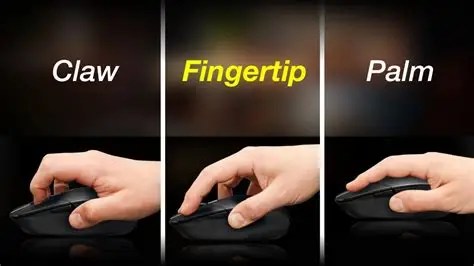
Most people naturally fall into one of three common mouse grips: palm, claw, or fingertip.
None of them is necessarily better than the others. The right grip largely comes down to your hand size, the way you move your mouse, and what feels comfortable during longer gaming sessions.
Here’s what you need to know about each grip.
Note: The way you actually hold your mouse can have a big impact on which shape and size feels more comfortable to you.
1. Palm Grip
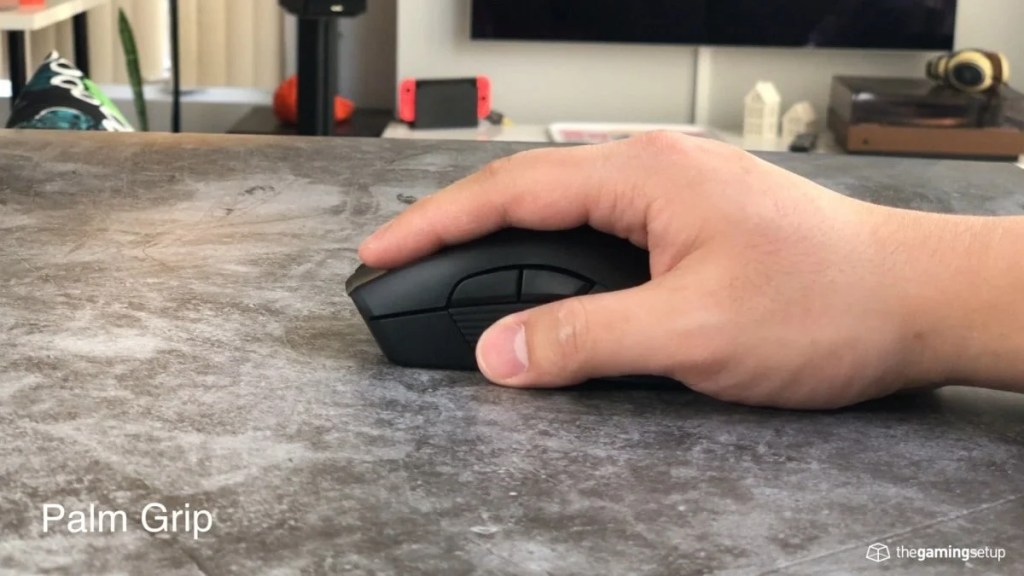
The palm grip is one of the most relaxed ways to hold a mouse.
With a palm grip, most of your hand rests against the mouse, including a large portion of your palm. Your fingers generally lie flat across the mouse buttons.
What does a palm grip look like?
Your hand is essentially resting on top of the mouse rather than hovering over it.
This gives you plenty of contact with the mouse and can make it feel stable while you’re using it.
Pros of a palm grip
- Comfortable for longer periods
- Provides plenty of stability
- Requires less finger tension
- Often feels natural for beginners
Cons of a palm grip
- Can feel less agile than other grips
- Larger movements may come primarily from your arm
- Some smaller mice can feel uncomfortable with this grip
Palm grip users will often prefer larger, more ergonomic mice that give their palm plenty of room to rest.
If comfort is your biggest priority, a palm grip can be a good place to start.
Note: I personally use this grip, and I have as a gamer or writer. It is the most comfortable to use with my Logitech G703 Lightspeed and its the easiest to use in my personal opinion
2. Claw Grip
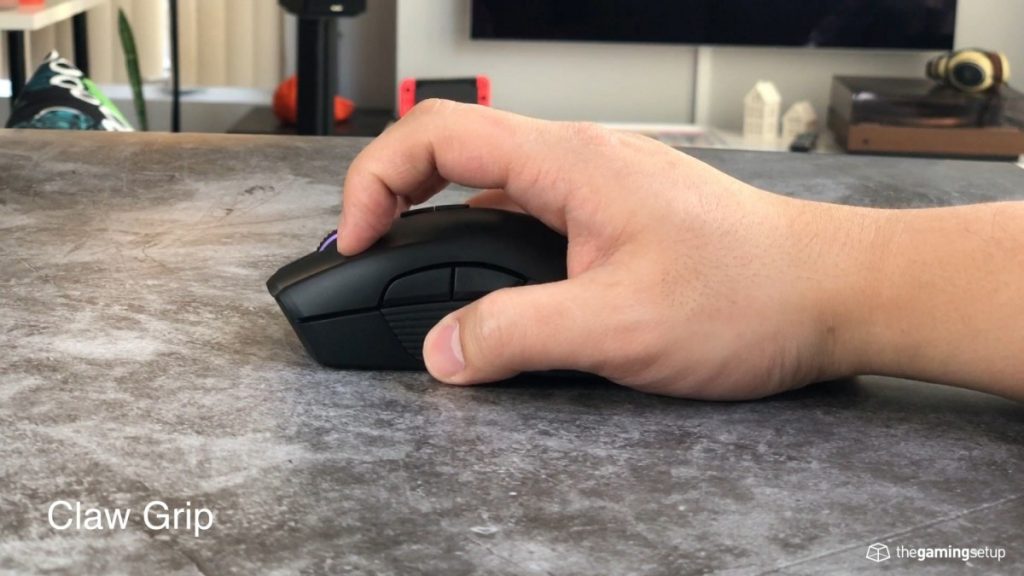
The claw grip sits somewhere between a palm and fingertip grip.
Your palm may still make contact with the back of the mouse, but your fingers are arched rather than lying completely flat. Your fingertips sit on the mouse buttons, creating a shape that resembles a claw.
Hence the name.
What does a claw grip look like?
Your palm provides some support at the rear of the mouse while your fingers are raised slightly and curved over the buttons.
This gives you a combination of stability and quick finger movement.
Pros of a claw grip
- Good balance between control and agility
- Allows quick clicking and adjustments
- Doesn’t require your entire hand to rest on the mouse
- Works well for a variety of games
Cons of a claw grip
- Can feel less relaxed than a palm grip
- May take some time to get used to
- The wrong mouse shape can make the grip uncomfortable
Claw grip users often have plenty of options because many gaming mice are designed around this middle ground between stability and movement.
If you want something that sits between the relaxed feel of a palm grip and the freedom of a fingertip grip, claw may be worth trying.
3. Fingertip Grip
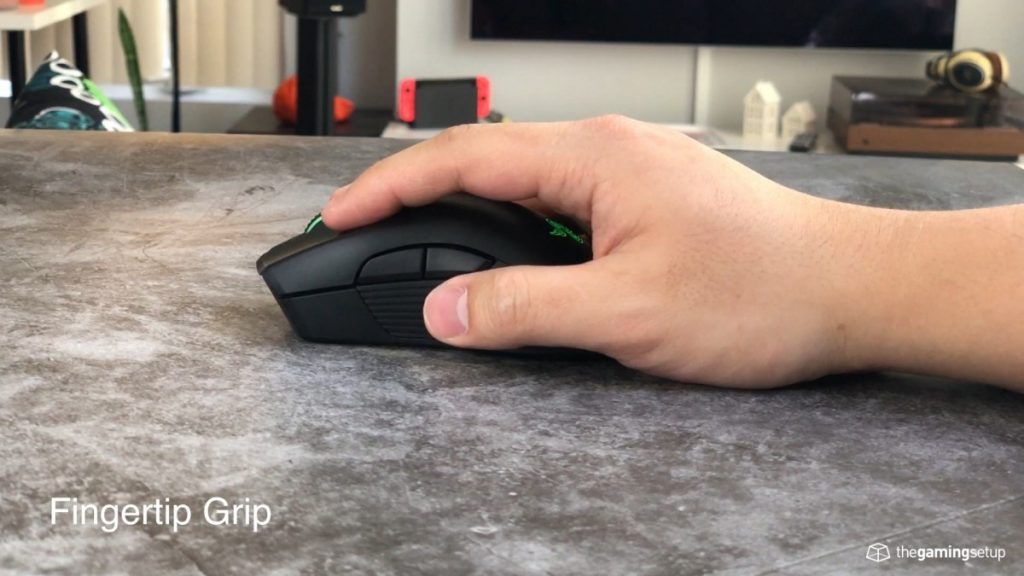
The fingertip grip is the least amount of hand contact of the three.
Instead of resting your palm on the mouse, you control the mouse primarily with your fingertips. Your palm stays away from the body of the mouse.
This allows your fingers to make very small and quick adjustments.
What does a fingertip grip look like?
Only your fingertips are making contact with the mouse.
Your hand essentially hovers above the mouse rather than resting on it.
Pros of a fingertip grip
- Allows very quick adjustments
- Gives your fingers a lot of freedom
- Can feel agile and responsive
- Works well with smaller, lighter mice for some users
Cons of a fingertip grip
- Can take more time to get used to
- Provides less palm support
- May feel less comfortable for some people over long sessions
- Mouse size becomes particularly important
Fingertip users often prefer smaller or lighter mice, although there isn’t one specific mouse size that works for everyone.
Palm vs Claw vs Fingertip: What’s the Difference?
The easiest way to think about the three grips is the amount of hand contact you have with the mouse.
| Grip | Hand Contact | Main Characteristic |
|---|---|---|
| Palm | Most of your hand | Stability & comfort |
| Claw | Palm + fingertips | Balance between control & agility |
| Fingertip | Mainly fingertips | Freedom & quick adjustments |
However, these aren’t strict categories.
You might naturally use a grip that sits somewhere between two styles. You may also change your grip depending on the mouse you’re using.
That’s completely normal.
Which Mouse Grip Is Best?
There isn’t a universally “best” mouse grip.
Instead, the best grip is the one that feels natural and comfortable for you.
If you prefer having your hand supported by the mouse, a palm grip may feel best.
If you want a mixture of palm support and finger movement, try a claw grip.
If you prefer controlling the mouse mostly with your fingers, fingertip grip may be more natural.
Your hand size also matters. A mouse that feels comfortable in a palm grip for one person might feel too small for another.
That’s why simply buying a mouse because someone says it’s “the best” isn’t always the right approach.
How Do You Know Which Grip You Use?
The easiest way is simply to pick up your current mouse without thinking too much about it.
Look at your hand.
- Is most of your palm resting against the mouse? You’re probably using a palm grip.
- Is your palm touching the back while your fingers are noticeably curved? You may use a claw grip.
- Are only your fingertips touching the mouse while your palm stays off it? You’re likely using a fingertip grip.
You don’t necessarily need to force yourself into one particular grip.
Your natural grip is a useful starting point when choosing your next mouse.
Does Your Mouse Need to Match Your Grip?
Ideally, yes.
Mouse shape, size, weight and hump placement can all affect how comfortable a particular grip feels.
For example, someone who uses a palm grip may appreciate a mouse that provides plenty of support for their hand, while someone using a fingertip grip may prefer something that doesn’t get in the way of their fingers.
This is one reason mouse shape can be just as important as the specifications listed on the box.
A mouse can have an excellent sensor and an extremely high polling rate, but if the shape doesn’t work with your hand, those specifications aren’t going to make it comfortable to use.
Final Thoughts
Choosing a gaming mouse isn’t just about looking at its specifications.
Your grip matters too.
Palm, claw and fingertip grips each offer a different balance of comfort, stability and movement. None is automatically better than the others, and you don’t need to force yourself into a particular grip simply because it’s popular.
Start with the grip that feels natural to you, consider your hand size, and then look for a mouse shape that supports the way you actually use it.
After all, the best gaming mouse isn’t necessarily the one with the most impressive specifications.
It’s the one that feels right in your hand.
 TechWithTristan
Leave a comment